


Beauty Camera -AI Photo Editor
4.352.00 Reviews
App Specs
- Version
- 1.46
- Updated On
- License
- Free
- Downloads
- 1,000,000+
- Developer
- Kamrej Apps
- Categories
- Beauty
- Platform
- Android
Screenshots


 Analysis by AppCompare
I tend to be careful with beauty editors: the quick results can be appealing, but a face can stop looking like itself after a few automatic adjustments. Beauty Camera - AI Photo Editor is best approached as a hands-on photo editor rather than a one-tap fix. I’d use it to make a portrait feel more polished, then check each change before saving. That small pause matters when an image includes your face or someone else’s.
Trust starts with choices, not assumptions
Beauty Camera is a free beauty app from Kamrej Apps, with optional in-app purchases priced at $7.99 per item. Its audience is broad: the content rating is Everyone, and it has reached over a million installs. Those details tell me the app is widely used, but they don’t replace the practical question I ask of any photo editor: do I feel comfortable selecting this particular image and deciding what to do with it?
I wouldn’t treat an editor’s popularity as proof of how it handles personal photos. Instead, I’d make a deliberate choice about which image to open, avoid using a sensitive photo just to test a tool, and review the finished result before sharing it. If privacy is your main concern, check the app’s current permission prompts and available privacy information on your device before importing portraits. I don’t grant access casually; I choose the narrowest option that still lets me do the task I have in mind.
Keep control of the edit
The most useful way to approach beautification is as a series of small decisions. I’d start with the original image, apply one adjustment at a time, and compare the result with the untouched version. That makes it easier to spot when smoothing, reshaping, or makeup effects have become stronger than intended. A subtle edit can make a portrait feel finished; several strong effects layered together can make the face look less natural.
It also helps to think about the destination before editing. A close-up portrait for a profile picture may benefit from a different balance than a group photo or a picture meant to preserve a real moment. If a tool changes the look of a face in a way that would surprise the person pictured, I’d reduce or remove that edit. The point is not to avoid effects, but to keep the final image aligned with what you want it to say.
Good moments to reach for it
For a quick everyday example, imagine taking a selfie before meeting friends and noticing that the lighting makes your face look tired. I’d try a light touch-up, check that skin texture and expression still look like mine, then save a version for sharing. For a holiday portrait, I’d be more restrained: the location and people are the memory, so I’d prioritize a natural-looking filter over reshaping features or stacking makeup effects.
This is the kind of app I’d recommend to someone who enjoys experimenting with selfies and wants accessible beauty controls without learning a desktop editor. It may be less suitable if you need precise professional retouching, want a strictly natural camera output, or would rather avoid face-altering effects altogether. In those cases, a standard gallery editor or a more manual photo-editing app may fit better.
Worth Reading Before You Choose

EA SPORTS FC Mobile 26 Is a Bigger Football Game, but It Takes Time

Flipboard Shows What News Apps Must Do Beyond the Feed

Switching to Android Auto Means Rethinking Your Driving Routine

Google Calendar Makes a Crowded Week Easier to Manage

Ludo King Makes the Most of the Minutes Between Plans

Baby Panda World Brings Quick Play to Modern Phones, but Its Game Library Feels Busy
How it fits among photo editors
Compared with a basic phone gallery editor, Beauty Camera is oriented toward portraits: beautification and virtual makeup are central to the experience, rather than being occasional adjustments among general image tools. That focus makes it convenient when the job is a selfie, but it is not automatically the better choice for every photo. For landscapes, documents, or careful color correction, a general-purpose editor may offer a more relevant workflow.
Compared with editors that ask you to make every adjustment manually, automatic facial enhancement can be faster, but it also calls for a closer review. I’d treat the suggested look as a starting point, not a verdict on how the photo should appear. One practical tip is to finish the face edits before choosing a strong filter: otherwise, the filter’s color and contrast can make it harder to judge whether the earlier adjustments still look natural.
Small checks that prevent bigger regrets
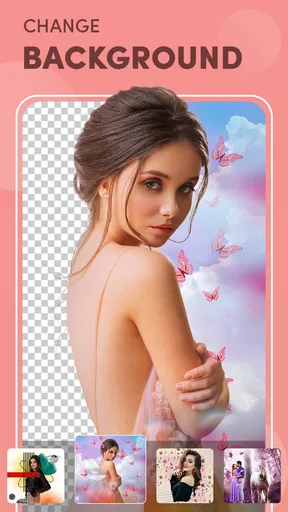
Before sharing a portrait, I’d zoom in on the eyes, hairline, and edges of the face, especially after using background blur. Those areas make it easier to notice a cutout that looks distracting or an effect that doesn’t sit naturally with the background. I’d also compare the edited image with the original at normal viewing size; a change that seems appealing while zoomed in can feel excessive once the whole picture is visible.
If you plan to use a consistent look across several photos, save or note the settings you like, then check each image individually. The same effect can look different under indoor light, sunlight, or a busy background, so applying one preferred treatment blindly may produce uneven results. I’d use a repeatable style as a guide while still adjusting it to suit each portrait.
Another useful habit is to keep an unedited copy when the photo matters. That gives you a clean reference if you later decide that the makeup, reshape, text, or stickers distract from the moment. It also makes experimentation feel lower-risk: you can try a playful version for a post without treating it as the only version of the image.
First Impressions and User Interface
When I first opened Beauty Camera - AI Photo Editor, I was greeted with a clean and intuitive interface. The design is sleek and modern, making it easy to navigate through the different features. Even if you’re not tech-savvy, you’ll find the layout user-friendly, with everything clearly labeled. It didn’t take long for me to figure out where everything was, which is always a plus.
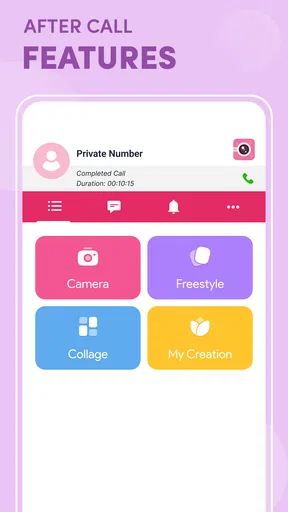
The app starts with options for taking a new photo or selecting one from your gallery. Once you choose a photo, you’re immediately presented with a range of editing tools. The app feels responsive, with a smooth transition between different screens and tools.
Features That Stand Out
The magic really happens when you start exploring the editing features. The app offers various tools to enhance your photos, but there are a few that really stand out:
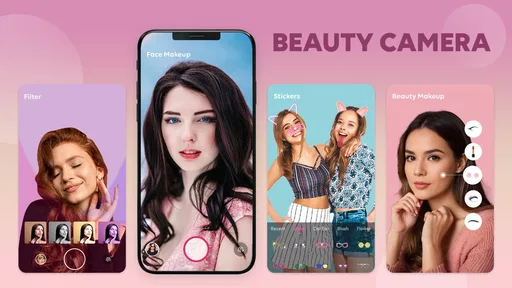
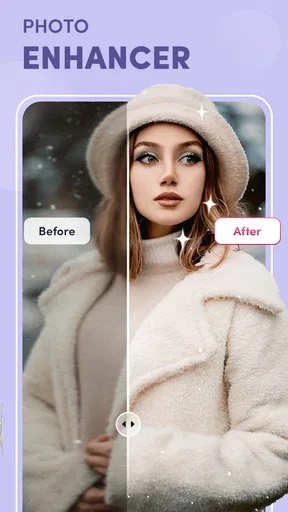
- AI Beautification: The AI technology automatically detects facial features and applies enhancements to smooth skin, brighten eyes, and even whiten teeth. It’s like having a personal stylist at your fingertips.
- Filters Galore: With a vast selection of filters, you can set the mood of your photo in seconds. Whether you want a vintage look or something more vibrant, there’s a filter for every occasion.
- Background Blur: Want to make your selfies pop? The background blur feature creates a bokeh effect, similar to what you’d find in high-end DSLR cameras.
What I loved most is how easy it is to apply these edits. You can see the changes in real-time, and the app allows you to adjust the intensity of each effect, giving you full control over the final result.
Advanced Editing Tools
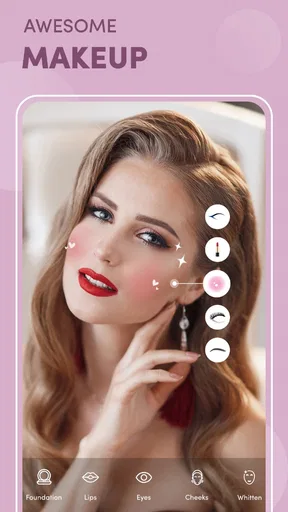
Beyond the basic enhancements, the app offers advanced tools for those who really want to get creative. There’s a reshape tool that allows you to subtly adjust facial features, and a makeup tool that lets you apply virtual makeup. The makeup feature is particularly impressive, with options for lipstick, blush, and even contact lenses.
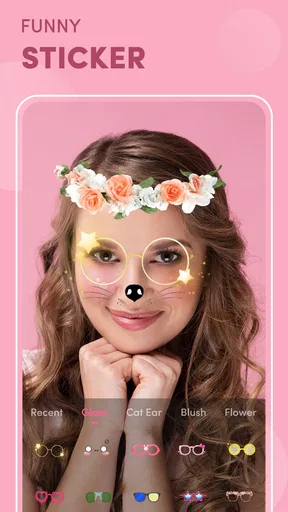
The app also includes a variety of stickers and text options to add a fun touch to your photos. You can easily personalize your images with captions or graphics, making it a versatile tool for social media enthusiasts.
Sharing and Saving Options
Once you’ve edited your masterpiece, sharing it is a breeze. The app provides direct sharing options to popular social media platforms like Instagram, Facebook, and Twitter. If you prefer to keep your edits private, you can save them directly to your device in high resolution.
One feature I found particularly useful is the ability to save your favorite settings. This means you can apply the same edits to different photos without having to start from scratch each time. It’s a real time-saver, especially if you have a signature look you like to maintain across your social media profiles.
Final Thoughts
Overall, Beauty Camera - AI Photo Editor is a powerful yet easy-to-use app that offers a range of features to enhance your photos. Whether you’re a selfie enthusiast or just want to touch up your vacation photos, this app has something for everyone. The AI technology provides professional-level edits with minimal effort, making it accessible for users of all skill levels.
The app’s seamless integration with social media and its array of editing tools make it a must-have for anyone looking to step up their photo game. If you haven’t tried it yet, I highly recommend giving it a go. You’ll be amazed at how a few simple tweaks can transform your photos from average to amazing.
Who will get the most from it?
The app’s appeal is clearest when I have one portrait to finish quickly, rather than a large batch of images that need consistent, precise correction. Its mix of face-focused edits, filters, makeup, and playful additions makes it handy for profile photos, casual selfies, and social posts where a little personality is welcome. If I’m preparing an image for a résumé, a formal profile, or an occasion where likeness matters more than polish, I’d keep the adjustments especially light or choose a conventional editor instead.
There is also a difference between a tool being easy to use and every result being effortless. Automatic enhancement may give a useful first pass, but different lighting and angles can change what looks convincing. I’d spend a moment checking each adjustment rather than assuming that an AI treatment will suit every face equally well. The controls are most valuable when they help me make a choice, not when I let the app make every choice for me.
Practical details before installing
The app is free to download, though individual in-app purchases are listed at $7.99 per item, so I’d look carefully at any purchase prompt and decide whether an option is worth it before proceeding. It was released on August 10, 2023, and the current version is 1.46, with Android 8.0 as the minimum operating system. Its average rating is 4.2 from around three thousand ratings, alongside thirty-two written reviews. I see that as a useful snapshot of how people have responded, not a substitute for checking whether its portrait-first approach matches my own needs.
One question many people have is whether they need editing experience. I don’t think so: the straightforward layout and visible effect adjustments make it approachable, while the more creative tools give curious users room to experiment. Another is whether it suits photos beyond selfies. It can be used on other portraits too, but its beauty-focused controls are less compelling for scenery or general image cleanup. For those jobs, I’d reach first for an editor built around broader adjustments.
It is also worth deciding what “natural” means to you before opening the tools. For one person, that may mean a gentle filter and a small brightness adjustment; for another, it may include virtual makeup. I’d judge the result against the original photo and the context in which I plan to use it, rather than chasing an abstract idea of flawlessness. This helps keep the app enjoyable instead of turning a quick edit into a long effort to perfect every detail.
A cautious verdict on a portrait-focused editor
Beauty Camera has a clear purpose and makes portrait editing approachable, particularly when I want to try beautification, makeup, filters, or a softened background without moving to a desktop workflow. Its main trade-off is the same one that comes with many face-centered editors: convenience can encourage stronger edits than a photo needs, and the best result still depends on my judgment. I’d recommend it to casual selfie and portrait editors who like visible choices and are comfortable reviewing their images before sharing.
If you prefer edits that preserve every feature, need detailed control over a broad range of photography, or simply don’t want to use beauty effects, this is not the option I’d pick first. For everyone else, I’d start with a non-sensitive photo, try one tool at a time, and keep the original available while deciding what feels right. That cautious approach lets the app’s creative side shine without asking it to define how a person in the picture should look.
Pros
- Intuitive interface for easy navigation.
- Wide range of filters and effects.
- AI-powered enhancements for selfies.
- Quick save and share options.
- Regular updates with new features.
Cons
- Contains in-app purchases and ads.
- Requires internet for some features.
- Limited tools in free version.
- Can drain battery quickly.
- Occasional lag on older devices.
FAQs for Beauty Camera -AI Photo Editor
What features does Beauty Camera - AI Photo Editor offer?
Beauty Camera - AI Photo Editor provides a wide array of features including AI-powered facial enhancements, real-time beauty filters, and advanced photo editing tools like blemish removal, teeth whitening, and skin smoothing. It also offers artistic filters and makeup editing capabilities, allowing users to completely transform their images with ease.
Is Beauty Camera - AI Photo Editor free to use?
Beauty Camera - AI Photo Editor offers a free version with basic features, but for access to premium features such as advanced filters and high-level editing tools, a subscription may be required. The app often provides a free trial period for users to explore premium features before committing to a subscription.
Does Beauty Camera - AI Photo Editor require an internet connection?
While many features of the Beauty Camera - AI Photo Editor can be used offline, certain functionalities, like downloading new filters or accessing cloud storage options, require an active internet connection. This ensures users can access the latest updates and additional content provided by the developers.
Is my data safe with Beauty Camera - AI Photo Editor?
Beauty Camera - AI Photo Editor takes user privacy seriously, ensuring that personal data and photos are securely stored and not shared with third-party advertisers without consent. Users are encouraged to review the app’s privacy policy to understand how data is handled and the measures in place to protect user information.
Can Beauty Camera - AI Photo Editor be used on all devices?
Beauty Camera - AI Photo Editor is compatible with most Android and iOS devices. However, it is important to check the app's requirements on the respective app stores to ensure compatibility with your device. Older devices might experience limitations in functionality or performance when using this app.


